
Last updated: October 13, 2026
In short: Quick Answer: the right AI content optimization workflow usually has 5 steps, and it turns a weak draft into a page that is clearer, more useful, and easier to rank without turning your process into a content mill. If you need a repeatable system, start with human judgment, use AI for diagnosis and rewrites, and keep final decisions tied to search intent, brand voice, and real evidence. The AI content optimization workflow — The Complete Guide below is written for teams editing existing pages, not just generating new text.
Key Takeaways
- AI tools can support specific editing steps in an existing article, not replace the whole process.
- The right workflow depends on page type, search intent, and how much original substance the article already has.
- For a live article, diagnosis should come before editing and verification before publication.
- Different tools fit different stages, and forcing one tool to do everything often hurts quality.
What AI content optimization workflow actually means
AI content optimization workflow means using AI tools at specific points in the editing process to improve an existing article, not to spray out generic copy. If you are starting from a draft, a live page, or a stale article, the workflow should help you find what is missing, what is repetitive, what is off-intent, and what should be rewritten first. If you are hoping AI will replace the editorial job, the answer flips: it usually makes bad structure faster, not better.
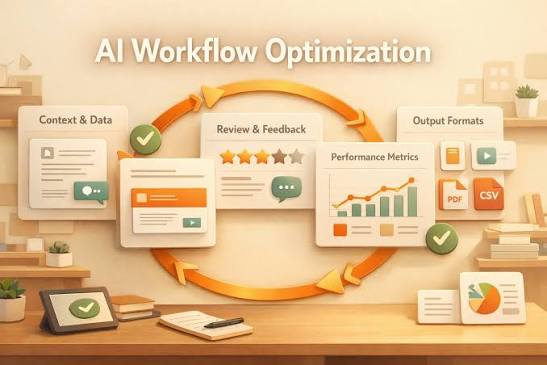
This is the part most generic advice gets wrong. It treats optimization as one action, like “run it through an AI tool.” Real optimization is a chain of decisions. I would break it into five moves: diagnose, prioritize, revise, verify, and publish. The tool can help in each step, but it cannot tell you whether the article deserves to exist, whether the angle is thin, or whether the query needs original examples, product comparisons, or a direct answer.
The workflow also changes depending on what you’re working on, and if the page is high stakes it is wise to consult a professional or specialist before publishing. A category page for a software product needs different treatment than a blog post about “best X tools” or a help article about setup. For software buyers, the useful version of AI content optimization is usually about sharpening the page so it answers the buyer’s immediate question, connects to product reality, and removes vague marketing language. According to Google Search Central, helpful pages should satisfy the user rather than chase keywords alone.
Here is the simple rule I use: if the page is already close, AI should help you tighten and verify. If the page is structurally wrong, AI should help you diagnose the gaps, but a human has to decide the fix, and in sensitive cases you should consult a professional. The Google Search Quality Rater Guidelines also emphasize helpfulness, expertise, and trust as quality signals.
Quick check: if your main question is “How do I make this page better without rewriting it from scratch?” this is the workflow you want.
What actually determines the right answer here
The right workflow depends on the page type, the search intent, and how much original substance the page already has. If the page is informational and already ranks somewhere on page 2 or 3, then AI can be useful for gap-finding and section rewrites. If the page is a product landing page or comparison page, then the bigger issue is usually clarity of offer and proof, not sentence polish. If the page is thin, duplicated, or written for keywords instead of people, then optimization alone will not save it.
The first decision is whether you are optimizing for a new page or a live page. New pages need structure before style. Live pages need diagnosis before editing. A page with 800 words and no clear answer needs a different path than a page with 2,500 words that repeats itself and buries the point.
The second decision is what “success” means. If you care about organic traffic, you need query alignment, headings that match the search task, and coverage of the obvious follow-up questions. If you care about conversions, the page must reduce uncertainty, show fit, and make the next step obvious. If you care about internal support load, the page should answer the same question in the same language your customers use. Search Central’s guidance on helpful content is useful here because it pushes you toward answer quality, not just term coverage.
The third decision is whether AI is allowed to write or only allowed to assist. Some teams use AI as a blunt rewrite engine. I would not recommend that for regulated, technical, or brand-sensitive content. The trade-off is speed versus control. AI can cut 30 minutes to 10 on some edits, but the more important the claim, the more manual checking you need. In a 2024 content workflow, that time saving only matters if the review step still catches errors.
| Situation | Best Path | Why Other Options Fail |
|---|---|---|
| Thin blog post targeting a clear informational query | Use AI for outline expansion, query matching, and FAQ extraction | Pure rewrite tools often add fluff without improving usefulness |
| Product or SaaS landing page | Use AI for clarity passes, objection mapping, and headline alternatives | Generic SEO optimization can weaken the offer and blur the CTA |
| Existing article with outdated sections | Use AI to identify stale claims, duplicate headings, and missing subtopics | Starting from scratch wastes working sections that already earn clicks |
| Highly technical or regulated content | Use AI only as a drafting assistant; verify every claim manually | Fully automated rewriting risks errors, legal exposure, and trust loss |
A simple example: if the page is about “AI content optimization workflow,” the query itself suggests a process. That means the page should explain steps, tools, decision points, trade-offs, and common failure modes. A list of AI writing tools alone is not enough. That’s a tool roundup, not a workflow.
Quick check: if you are deciding between a full rewrite and a light optimization pass, the answer depends on whether the article’s problem is structure, clarity, or proof.
How I would build the workflow for a live article
If you already have a published article, then a sensible workflow is diagnosis first, editing second, and verification last. If you start rewriting before you know what is broken, you usually make the page longer without making it more useful.
I would use this sequence for a live article in most content teams:
- Read the page as a searcher. Ask what the page promises in the first 10 seconds. If the answer is fuzzy, note that before touching the copy.
- Check the query and intent match. Compare the page to the actual search task. If users want a workflow, the page must show process, not just description.
- Map the gaps. Use AI to compare the page against common subquestions: tools, steps, approval, quality control, risks, and reporting. Keep only the gaps that matter.
- Rewrite the structure, not just the sentences. Move the most useful answer higher, cut overlap, and rename headings so each one does a job.
- Use AI for section-level edits. Ask for tighter summaries, clearer transitions, alternative examples, or missing edge cases. Do not ask it to “make it SEO-friendly” and hope for the best.
- Verify every factual or product-specific claim. Check tool names, feature availability, policy language, standards, and any claim that could mislead a buyer.
- Publish, then monitor the page behavior. Watch scroll depth, click-throughs, and whether the page leads to the next action you want.
The biggest mistake here is treating AI as a replacement for editorial diagnosis. AI is very good at surfacing repetition, suggesting headings, and proposing alternate phrasings. It is weak at knowing what matters in your niche. That is why I would not let it decide the angle. It can help you answer the angle.
For software content, I would also check if the article names tools that a reader could actually use in the workflow. Examples include Surfer, Clearscope, Semrush, Ahrefs, Google Search Console, ChatGPT, Claude, and Frase. The point is not tool worship. The point is fit. If a team has Search Console data but no expensive SEO platform, the workflow should still work. You can also link to related resources such as Search Console best practices, content briefs, and SEO audits to keep the editing process grounded.
One more useful discipline: keep one source of truth for the content brief. If the AI prompt says one thing and the editor notes say another, the output gets mushy fast. A good brief is usually 1 page, not 12.
Quick check: if your current workflow feels like “prompt, paste, publish,” it needs diagnosis and verification before it needs more writing.
Which AI tools belong at each step of the workflow?
Different tools belong in different parts of the workflow, and forcing one tool to do everything is where quality slips. If you need planning and revision help, a general model like ChatGPT or Claude can work well. If you need SEO gap analysis, tools like Clearscope, Surfer, Frase, Ahrefs, or Semrush are better suited because they are built around search coverage and competitive context. If you need source checking, Google Search Console and the original source documents matter more than any writing assistant. For teams comparing options, a tool stack page or AI content checklist can help standardize decisions.
I would think about the workflow in four tool layers:
- Planning layer: ChatGPT, Claude, or similar LLMs for outlining, angle testing, and question expansion.
- SEO layer: Clearscope, Surfer, Frase, Semrush, Ahrefs, or MarketMuse for related topics and term coverage.
- Verification layer: Google Search Console, analytics, product docs, style guides, and source links.
- Editing layer: Grammarly, LanguageTool, Hemingway, or built-in editor features for readability and mechanical cleanup.
The trade-off is simple. More specialized tools give better guidance on a narrower task, but they cost more and can push you toward keyword-shaped writing if you follow them too literally. General AI tools are cheaper and more flexible, but they need stronger human oversight. If you are a small team, that trade-off matters. If you are a large content operation, tool sprawl matters just as much.
I would be careful with any tool that scores content by “SEO score” alone. Scores can be useful as a checklist, but they are not the same as usefulness. A page can hit an arbitrary term list and still fail the reader. That is especially true for software articles, where real buyers want use cases, constraints, setup steps, and implementation notes, not just a pile of repeated nouns.
A practical filter: if a tool tells you what terms are missing, good. If it starts writing the article for you, slow down. If it claims to know intent better than the search results and your support tickets, be skeptical. The search results, customer questions, and product docs usually carry more truth than the model’s guess.
Quick check: if you already have one AI tool but no SEO data source, you are half-equipped at best.
A step-by-step AI content optimization workflow I would actually use
If I were optimizing a software article from scratch, I would use a six-step workflow that keeps the human decisions in the right places. If the page is high stakes or highly visible, I would add a final legal or product review before publishing. For teams that want a repeatable AI content optimization workflow, the key is to keep each step small enough to repeat.
- Define the job of the page. Say in one sentence what the reader should be able to do after reading. Example: “Choose the right AI content optimization process for a blog, landing page, or help article.”
- Extract the real subquestions. Ask an AI model to list the top follow-up questions, then compare those against search results, support docs, and internal sales questions.
- Build the structure. Turn the page into sections that answer those subquestions in order: what it is, when it works, what tools fit, steps, edge cases, and mistakes to avoid.
- Draft section by section. Use AI to expand one section at a time so the model stays focused. Shorter prompts usually produce less drift than “write the whole article.”
- Run a red-team pass. Ask the model to find weak claims, vague phrasing, hidden assumptions, and missing trade-offs. Then decide which issues are real.
- Human-edit for judgment. Fix the angle, tighten the first 150 words, cut duplicated examples, and make sure each section earns its place.
This workflow works because it separates generation from evaluation. AI is decent at variation. It is not reliably good at editorial judgment. That distinction matters when a page needs to rank and convert. According to Google, pages should be created for users first, which is why the workflow has to end with human review.
I would also keep a running list of “do not say” items. For example: do not claim a tool guarantees rankings, do not invent productivity gains, do not say a feature exists unless the product docs confirm it, and do not imply that AI can fact-check itself. If you need hard evidence, use primary sources. Google Search Central is a useful reference for search guidance, and the Google Search Quality Rater Guidelines are worth knowing because they show what “helpful” content tends to look like in practice. For content standards, the ISO 9001 framework is a useful reminder that process matters as much as output, even though it is not an SEO standard. If in doubt, consult a professional where compliance or legal risk is involved.
A good workflow also makes room for what AI should not do. I would not let it rewrite quotations, invent examples, or smooth over uncertainty that should stay visible. If the answer depends on budget, team size, content type, or compliance risk, say so plainly.
Quick check: if your drafts keep sounding polished but not useful, the missing piece is usually separation of generation, review, and judgment.
When the standard advice is wrong
The standard advice is wrong when the content problem is not writing quality but business fit. If the article is asking the wrong question, AI editing will only make the wrong answer cleaner.
If you are dealing with a low-volume but high-value query, then optimize for precision, not breadth. A narrow page for a niche software use case can outperform a generic “complete guide” because it matches the real buyer task. If you are dealing with a broad informational topic, then breadth matters more, but only if the extra sections add distinct value. If they just repeat the same advice with different labels, cut them.
If you are dealing with an article that must support sales, then proof beats polish. Add examples, workflow screenshots, implementation notes, integration names, or support-language clarity. A smooth paragraph will not fix a missing proof point. If you are dealing with an article that serves support or onboarding, then clarity and step order matter more than persuasive language. The answer should be fast to scan.
If you are dealing with a site that publishes at scale, then consistency matters as much as quality. You need a naming convention for prompts, a review rubric, and a way to track which articles were AI-assisted. If you are dealing with a small team, then one good prompt template and one editorial checklist will beat a complex platform you can’t maintain.
I would also push back on the idea that more AI always means more optimization. Sometimes the best move is a human rewrite with a small AI assist. That is especially true if the article is already decent and only needs a sharper lead, a better heading hierarchy, or a clearer CTA. Over-automation is often how pages lose voice and specificity. For practical guidance, compare your workflow against Google Search Central recommendations and your own performance data.
Quick check: if the article’s real problem is topic selection, proof, or site consistency, the fix is not “use more AI.”
Edge cases where the normal advice breaks down
Some situations break the standard workflow, and if you ignore that, the article gets worse instead of better.
-
Situation: the article targets a YMYL-adjacent topic, like finance or health software.
What changes: claims need a higher verification bar, and tone matters more.
What to do instead: use AI only for structure and phrasing, then verify against authoritative sources such as government or professional body guidance. Keep disclaimers where needed and avoid sweeping claims. -
Situation: the article is meant to rank for a branded feature or product term.
What changes: the reader already knows something about the product, so generic definitions waste space.
What to do instead: prioritize setup steps, feature constraints, and decision points. AI can help rewrite for clarity, but it should not bury the product-specific details under generic SEO text. -
Situation: the article is a comparison page between software tools.
What changes: the content must stay current and fair, and tool details can change without warning.
What to do instead: compare by use case, workflow fit, and integrations instead of pretending there is a permanent “best” list. Verify each tool against its current documentation before publishing. -
Situation: the article is already ranking but has poor engagement.
What changes: the problem may be mismatch between search snippet promise and on-page delivery.
What to do instead: tighten the intro, move the answer up, and make headings more specific. AI can propose alternate leads, but the fix is usually structural, not cosmetic. -
Situation: the team needs content in multiple languages.
What changes: direct translation usually fails on intent and terminology.
What to do instead: localize the workflow, not just the wording. Have AI help with term adaptation, then have a native reviewer check for naturalness and domain fit. -
Situation: legal, privacy, or compliance language is involved.
What changes: one wrong sentence can create risk.
What to do instead: lock down approved language, minimize AI freedom, and route the article through the right internal reviewer before it ships. For any uncertainty about quotations, compliance, or workflow language, consult a professional.
The common thread is simple: when stakes go up, AI should narrow its role. It should assist the editor, not replace the editor.
Quick check: if your article touches compliance, branded product details, or high-value conversions, treat AI as a helper, not a final authority.
What the workflow should produce before you hit publish
If the workflow is working, the final article should answer the query fast, show the reader what to do next, and avoid vague filler. It should also feel written for one situation, not for every possible visitor. That is a hard balance, which is why a strong checklist helps.
Before publishing, I would want to see these five things:
- A clear lead within the first 100 words. The reader should know the article’s job immediately.
- A section structure that mirrors the task. If the topic is workflow, the article should move from diagnosis to steps to exceptions.
- At least one honest trade-off. For example: AI speeds drafting, but it increases the need for verification.
- Specific tools or standards named where useful. Not as decoration, but because buyers need names, not clouds.
- A final pass for truth and tone. If a sentence sounds like it could belong in any marketing article, it probably should be cut or rewritten.
A lot of teams ask for “optimization” when what they really need is editorial discipline. AI can help produce the first draft of that discipline, but it cannot own it. If you want the article to earn trust, you have to show your work: why this path, why these tools, why this order, why this caveat.
There is also a cost question that people avoid. AI content optimization workflows save time only if you keep them simple enough to repeat. A workflow with three models, four dashboards, and six approval gates will collapse under its own weight. A practical setup can be as small as one LLM, one SEO tool, one checklist, and one human editor.
The best version of this process is not the fanciest one. It is the one your team can actually use on the next 20 articles.
Quick check: if the article looks polished but still feels generic, your workflow is optimizing language instead of usefulness.
FAQ
Is AI content optimization workflow the same as AI writing?
No. AI writing starts with generation, while AI content optimization starts with a draft, a live page, or a content gap and tries to improve it.
What is the best AI tool for content optimization?
There is no single best tool. If you need SEO gap analysis, use a specialist like Clearscope, Surfer, Frase, Ahrefs, or Semrush; if you need drafting help, a general model like ChatGPT or Claude is usually enough.
Should I let AI rewrite my whole article?
Only if the article is weak in structure and you are prepared to verify and edit the result carefully. For most software content, section-by-section revision is safer and usually better.
How do I know if the workflow is working?
Look for clearer intent match, better engagement on the page, fewer repeated ideas, and more clicks to the next step. If the article gets longer but less useful, the workflow needs fixing.
What should I never automate?
I would never fully automate claims that affect trust: product features, compliance language, pricing details, benchmarks, and anything that depends on current documentation.
The bottom line
The right AI content optimization workflow is a human-led process that uses AI where it is strong: pattern spotting, draft expansion, and rewrite options. It fails when you ask AI to decide the angle, verify the facts, or replace judgment.
If you are optimizing software content, keep the workflow simple: define the article’s job, map the real subquestions, use AI for section-level help, verify the facts, and publish only after a human reads it like a buyer. That is slower than one-click automation, but it is the path that actually produces pages people keep open.
Drafted with AI; not yet reviewed by a person.